

It is easier to make one object that is isolated than to design a whole environment around it. A full environment is a combination of architecture, characters, props, lighting, terrain, and camera perspective. They are also used to help creators plan for story moments prior to actual production. Seed’s research by ByteDance is already looking at cutting-edge 3D generation and world-model research. There is not much public information about the upcoming initiative. The capabilities reported should be used to guide expectations and not as confirmed product specifications. Pippit is a useful tool for visual planning during this developing phase – one that is based on stories.
What Makes a Multi-Element 3D Environment
A multi-element environment is an environment that includes space, objects, characters, surfaces, lights, and visual context. The connection between each element and other elements should be clearly supported. A character should have believable scale when placed next to furniture, vehicles, doors, or buildings. While an AI video generator can produce appealing shots, spatial continuity needs careful planning. World-model thinking is a way of thinking that moves from images to connected spaces and persistent relationships. This helps with pre-production and makes it easier to understand where things are, how they’re going to move, where they’re going to be, and what sort of camera options there are. Spatial planning can retain product visibility in the promotional content without giving the impression of a premeditated scene. Story ideas can be arranged in Pippit, and visual ingredients can be kept in line between scenes.

The Building Blocks of a World-Model Environment
Seeworld is publicly listed as a new 3D world-model project connected to the Seed ecosystem and developed by ByteDance. It is not a publicly released product. So, necessary capabilities should be carefully qualified as expected. Current descriptions focus on environments, not on individual assets; spatial relations constitute a key part of these. A useful scene can be a combination of multiple interrelated building blocks, each of which has a specific creative function.
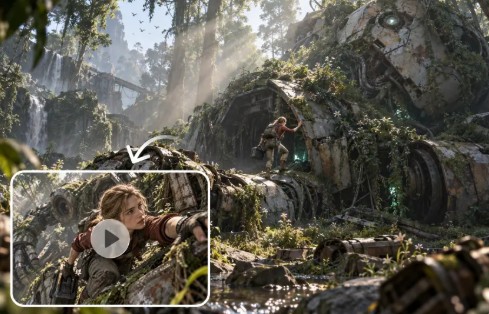
- Architecture: Defines boundaries, establishes scale, and anchors the setting.
- Characters: Provide narrative focus and create opportunities for movement or interaction.
- Props: Provide detail and enable certain actions within the story.
- Terrain: Influences the movement, the perspective, and the environmental context.
- Lighting: Enhances spatial readability and provides mood, contrast, and depth.
- Camera: sets the perspective of the viewer and composition in the environment.
- Background: Continuation of the setting and provides background information that goes beyond the main action.
When multiple objects are in a single scene, scale relationships are particularly significant. A chair must have a natural relationship to a person, a room, a table, and a doorway. Reuse environments also enable creators to experiment with various perspectives without having to rebuild all the elements.
Reference-Guided Generation: Starting From Existing Visual Direction
When a creator has a visual cue, reference-guided generation can help to minimize ambiguity. Images can convey architecture, landscape, interior, object, material, or atmosphere. References can also be used to create proportions, color relationships, and recognizable design cues. Public descriptions talk about ideas based on reference, and implementation details are not confirmed. Using reports as expectations prevents the mixing of proposed features and capabilities with released features. Pippit’s Creative Canvas enables prompt-based planning for visual resources and scene needs. A reference can give prompts for character appearance, setting, lighting, camera position, and mood. This approach establishes higher levels of congruence between creative intention and the output production materials.
Steps to Build Multi-Element Environments Using Seeworld’s World Features
Step 1: Map your multi-element environment
- Sign up for Pippit using Google, TikTok, or Facebook account info before building Seeworld environments.
- Open “Story Studio” from the left vertical menu on the home page to access environment controls.
- Use “Upload script” for scene planning, or choose “Paste script” to enter environmental instructions manually.
- From the top menu, use “AI scriptwriter” to develop scenes containing coordinated environmental elements.
- Select a fitting direction through “Style library” to keep every generated element visually coherent throughout.
- Choose “Default ratio” for the desired composition, then adjust “Episodes” for multiple environment variations.
- Finally, click “Generate” to create your initial environment and organize its major elements spatially.
Step 2: Assemble and direct world elements
- Use “Creative Canvas” to add images, scene videos, audio, characters, and defined roles across environments.
- Write prompts describing objects, character placement, lighting, camera angles, style, mood, setting, and product context.
- Once roles and elements are assigned, select “Batch generate” to produce multiple coordinated episodes efficiently.
Step 3: Review the complete environment
- Review generated episodes and refine characters, roles, scenes, audio, object placement, and environmental relationships carefully.
- After approving the results, click “Select all”, then choose “Download” to save generated episodes locally.
Managing Complexity Without Losing Spatial Clarity
For multi-element environments, prioritization is necessary as excessive information can dampen visual communication. Begin with main story or commercial elements. Include secondary elements that reinforce action but do not detract from it. Utilize contextual elements to create place, depth, and atmosphere. Visual motifs can be repeated to tie together distinct spaces and create related environments. Scale and spacing should be such that objects do not visually merge or create confusing overlaps. Pippit’s structured workflow can be used to plan prompts, characters, scenes, audio, and more. When multiple episodes are set in the same environment, clear organization becomes increasingly valuable.
Turning One Environment Into Multiple Visual Directions
Multiple camera positions and compositions can be used in a connected environment. A wide shot can be used to set up architecture before a close-up of the main subject. Another angle can draw focus to a product, prop, doorway, or environmental detail. If the lighting changes, the perceived hierarchy can change as well, without physically altering the hierarchy. Lighting can create a spotlight on a product in a bigger room. Distance, angle, and negative space can be used to emphasize that priority with framing. You can use Pippit’s episode workflow for repeated story directions that are made of related creative ingredients. This versatility makes one well-designed setting more useful throughout a wider range of content.
Conclusion
When it comes to visual development and production planning, environment-first thinking is a paradigm shift. Don’t worry about making one thing perfect; first define a relationship between significant scene elements. Architecture sets limits; characters and props provide activity in the narrative. Spatial understanding is enhanced by terrain, lighting, cameras, and backgrounds. Reference-led planning can help to limit ambiguity and maintain a clearer creative direction. World-model concepts are an extension of this thinking to the connected spaces and multiple viewpoints. More details of the upcoming ByteDance project have yet to be released, so its actual functions will need to be confirmed. Pippit offers a realistic process for implementing environment-first concepts in story-based video production today.